![Evovia_Logo_RGB.svg]](https://www.evovia.com/hubfs/Evovia_Logo_RGB.svg)
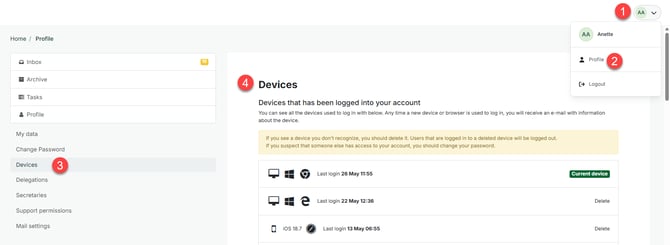
The employee can on the profile page see a list of the devices that have been logged in from.
It is possible to delete the devices from the list except for the device that the employee is currently logged into. When a device is deleted, the user will automatically be logged out of that device.
Devices can only be deleted by the employee.
Find devices
- Click the profile icon in the top-right corner.
- Select Profile.
- Select Devices.
- View and delete devices.