![Evovia_Logo_RGB.svg]](https://www.evovia.com/hubfs/Evovia_Logo_RGB.svg)
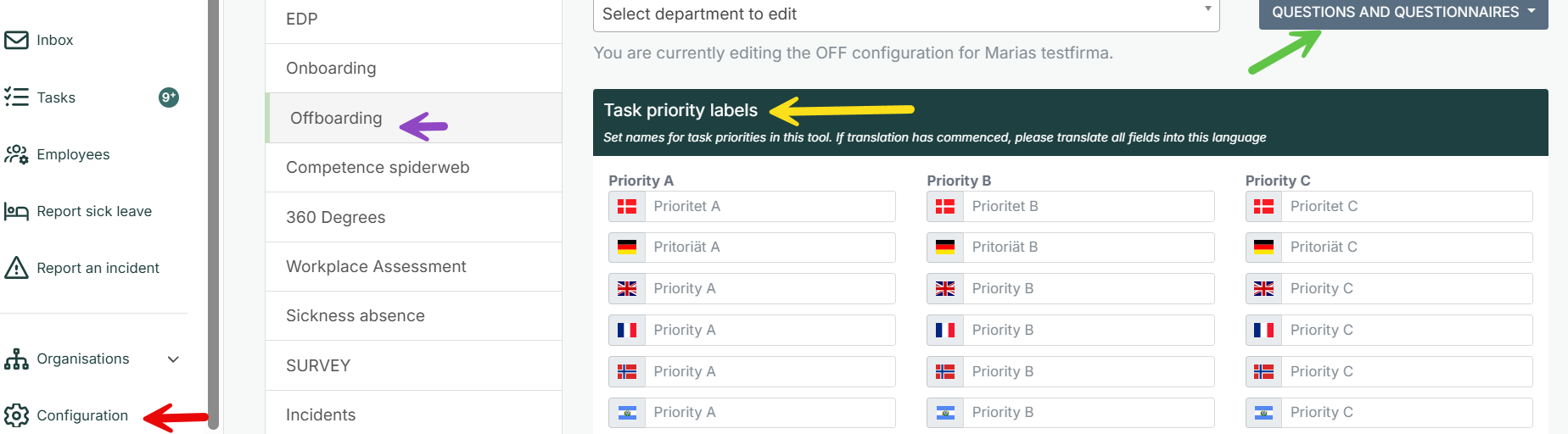
1. Click on ”Configuration” (red arrow).
2. Go to the tab ”Offboarding” (purple arrow). You have the following choices:
- Green arrow: See and edit the questionnaire. See our manual on editing questionnaires here.
- Yellow arrow: You can name the priorities for tasks such as Very important, Important, Less important, but this is not mandatory.
Delegation to set up an offboarding dialogue
- Department and statistics: Gives access to set up an offboarding dialogue. See how to administer this delegation.
- The owner of a department can also set up an offboarding dialogue for employees in the department.
- Employees who can set up an offboarding dialogue can also delegate certain dialogues to another employee, even though the other employee does not have any of the delegations mentioned above. This is done when setting up the offboarding dialogue. See how to in the manual How to use the offboarding module”.