![Evovia_Logo_RGB.svg]](https://www.evovia.com/hubfs/Evovia_Logo_RGB.svg)
Support does not have access to confidential data such as your EDP minutes. If support is to help you with a specific case where it is necessary to see, for example, a minute, you can provide support access.
1. Click the profile icon in the top-right corner
2. Select Profile.
3. Open the Support permissions tab.
4. Check the box to give support access.
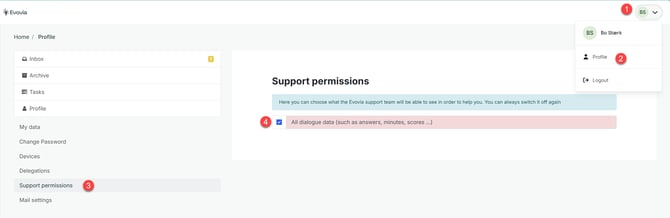
Remember to remove Support permission once your issue has been resolved. You can do this by unchecking the box.
When you have given support access, an information banner will appear at the top of the screen.
